
Oct
13
2016
13
2016
How to Schedule an Appointment For a Client
Appointments management is another feature OnlineInvoices presents to efficiently manage your clients. You can use appointments in the most effective way that suits your business, e.g., patients/doctors appointments, delivery/reception appointments, parent-teacher appointments, etc.
To schedule a new appointment with a client:
- Through the “Clients” tab. Select the “Appointments” option.
- The appointments page will list all recent appointments
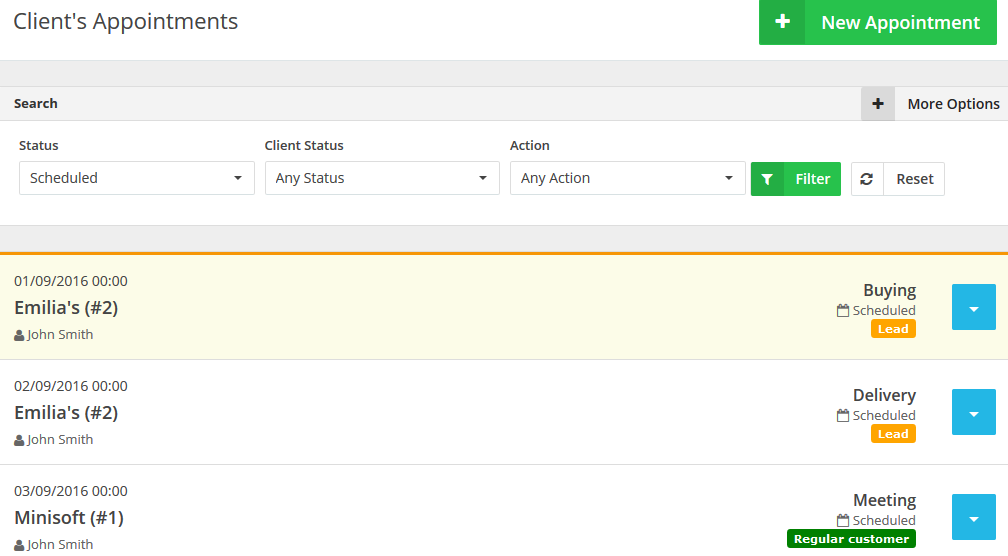
- Click the “New Appointment” button at the top right corner.
- The “Schedule a New Appointment” page will be populated as showing in the figure below.
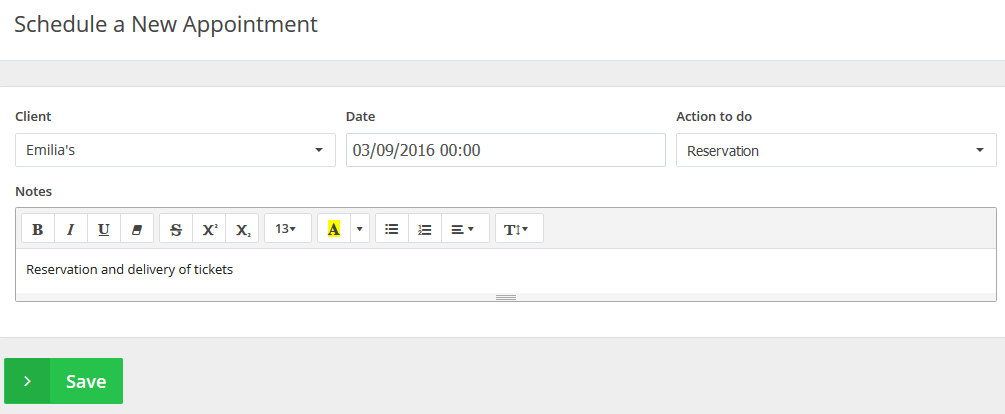
- Select a client from the “Client” drop-down menu.
- Select a date and a time frame from the “Date” calendar.
- Select an action from the “Action to-do” list. This list is completely customizable to suit your business needs.
- Add any related “Notes” to the appointment.
- Click the “Save” button to save the appointment.
Archives
- October 2022
- June 2022
- May 2022
- April 2022
- February 2017
- November 2016
- October 2016
- July 2016
- June 2016
- April 2016
- March 2016
- February 2016
- January 2016
- December 2015
- November 2015
- October 2015
- July 2015
- June 2015
- May 2015
- April 2015
- March 2014
- October 2013
- August 2013
- June 2013
- May 2013
- January 2013
- December 2012
